The Time Paradox
Building Timezone-Safe Python/Django Applications
- or -
How your code can be wrong
without changing a single line
Denny Biasiolli
WeAreDevelopers Online
Jul 2026
A Story from the Finance Team
April 3, 2025, 4:52 PM CET
The Head of Finance in New York
joins the Q1 close call
Why is our US East Coast revenue
$2.3 million lower than last quarter?
47 large March 31 payments never made it into Q1
The query Finance trusted
# Quarter Revenue & Cash Report (board + tax + commissions)

# received as parameters
quarter_start = "2025-01-01"
quarter_end   = "2025-04-01"

qs = (Payment.objects
    .filter(paid_at__gte=quarter_start,
            paid_at__lt=quarter_end)
    .annotate(quarter=TruncQuarter("paid_at"))
    .values("quarter")
    .annotate(total=Sum("amount"))
)
Simple. Correct. Obviously right.
Trusted by the CFO, controllers, and the entire finance team.
and the raw SQL version
SELECT date_trunc('quarter', paid_at) AS quarter,
       sum(amount) AS total
FROM payment
WHERE paid_at >= '2025-01-01'
  AND paid_at <  '2025-04-01'
GROUP BY quarter
ORDER BY quarter;
Runs the official quarter revenue recognition.
Runs cash reporting and tax.
Never questioned.
Example of a payment
that leaked into Q2
A customer in New York pays $340k
on March 31 at 19:17 PM local time
Recorded correctly as
paid_at 2025-03-31 19:17:00-05:00
(== 2025-04-01 00:17:00+00)
All the queries on the server run in UTC
and classify the payment as 2025-Q2
$2.3M just disappeared from Q1
- Wrong tax provisions and revenue recognition
- Payments (and sales commissions) booked in Q2
- Financial statements don't match the Q1
- Board deck and auditors start asking hard questions
How many of you have been personally victimized by a timezone bug?
Welcome to timezone therapy
I used to think: "It's just a number, how hard can it be?"
I was wrong. So very, very wrong
What is a timestamp?
A record in printed or digital form that shows the time at which something happened or was doneCambridge Dictionary
Simple, right?
That's what I thought too
Then I became a developer
ISO 8601
An international standard covering the exchange of date and time-related data
WikipediaISO 8601 Principles
- Values are ordered from the largest to the smallest unit of time (YYYY-MM-DDTHH:MM:SS)
- Each component is zero-padded to a fixed length
- For reduced precision, components can be omitted from the end (YYYY-MM, YYYY-MM-DD)
Timestamp in the technical world
The most common format is the Unix timestamp, a way to track time as a running total of seconds
This count starts at the Unix Epoch on
January 1st, 1970 at UTC
Why 1970? Some engineer said "let's start counting from now"
An arbitrary choice that now affects billions of devices
Timestamp in Python and JavaScript
| Python | JavaScript |
|---|---|
| Floating-point number | Integer number |
| Seconds (and fractions) since the Unix Epoch |
Milliseconds since the Unix Epoch |
|
|
2026-03-27T09:35:39.821862Z
Copy-paste a timestamp between them and your date is suddenly
either in the year 55,000 or 1970, depending on who you ask
A timestamp has no timezone
1761338139
It's the same number everywhere on Earth
The timezone only matters
when you display it to a human
Computers don't care about timezones, we invented this pain for ourselves
Timestamps don't lie
Timezones are just their interpreters
What is a timezone?
A region that observes a uniform standard time for legal, commercial, and social purposesWikipedia
India: UTC+5:30 Nepal: UTC+5:45
Half-hours. Quarter-hours. Because why not?!
Timezones in the Real World
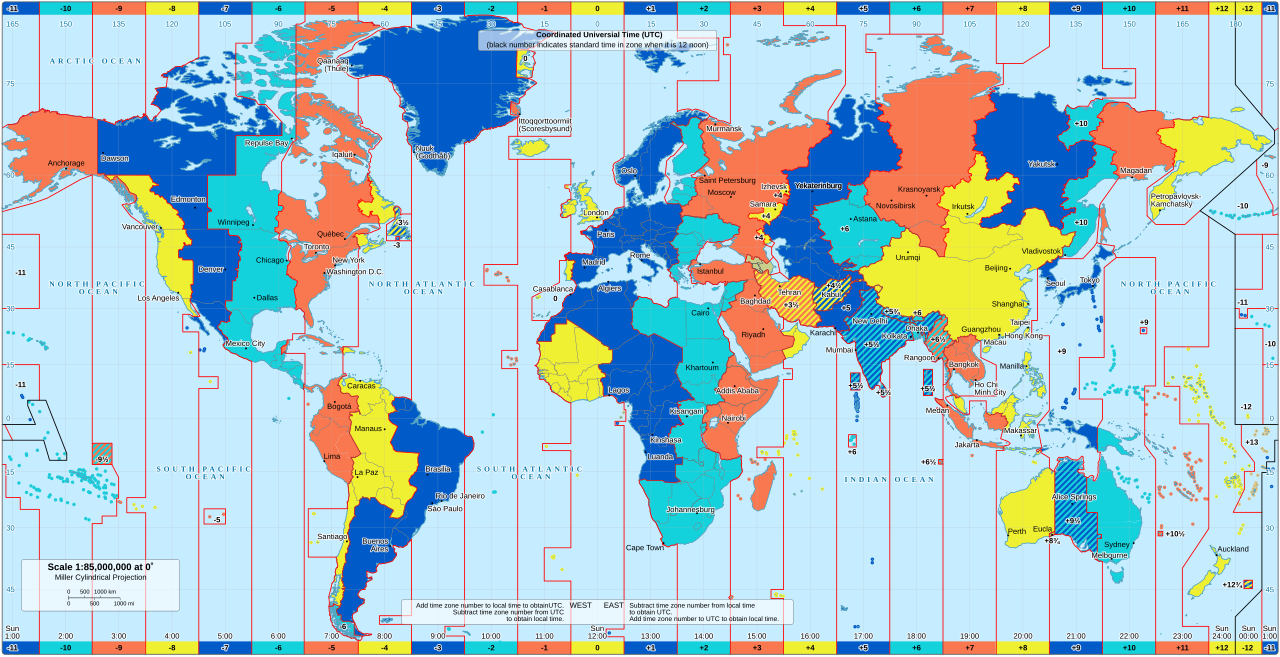 Date: 2021, Source: Wikimedia Commons
Timezones timeline
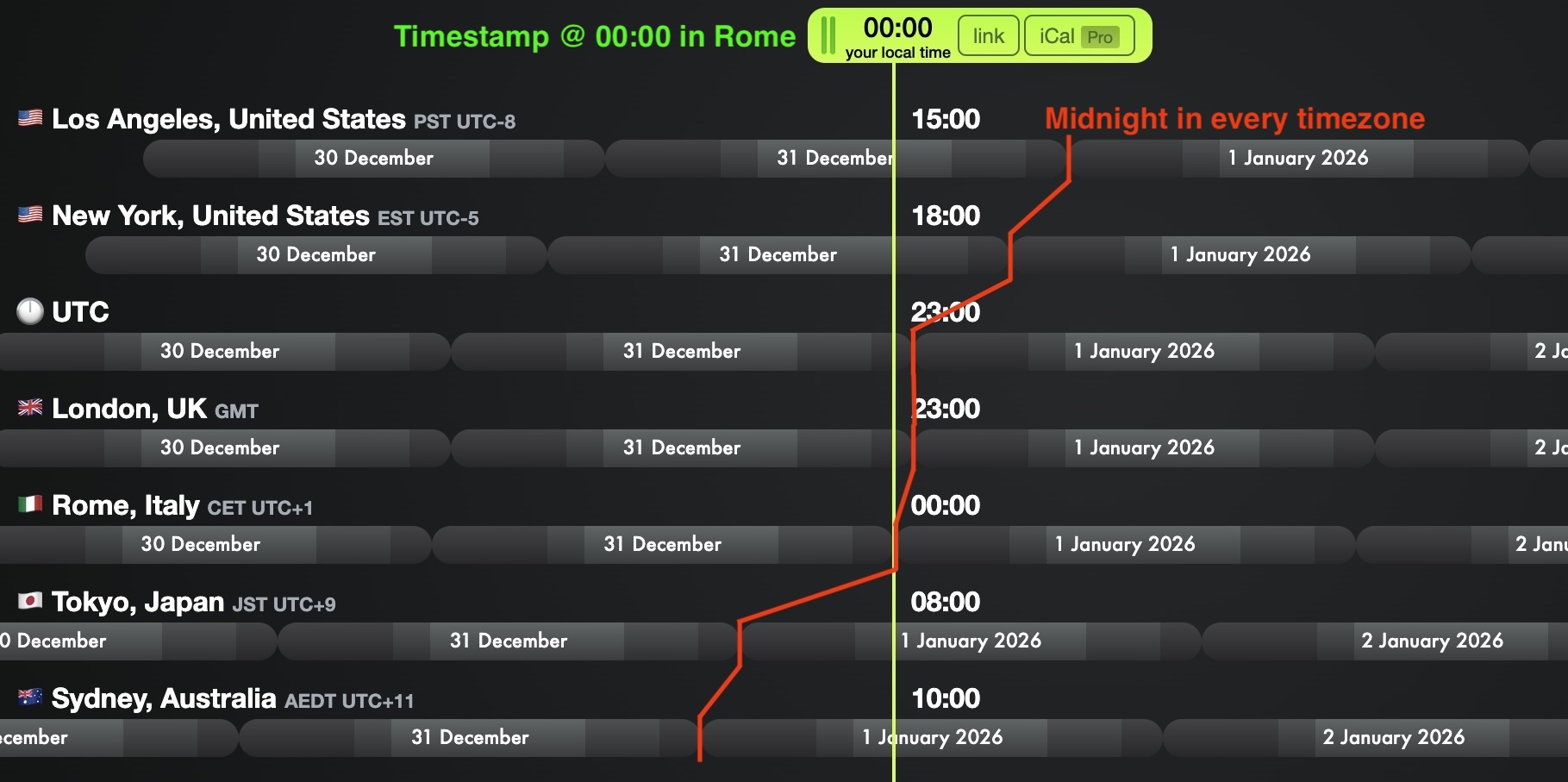 Created with everytimezone.com
A bug with no code changes
January 2025, fintech with customers in New York "Send daily statements at 9:00 AM"
The job had run correctly for months.
One morning in March, every statement for New York customers is generated at 10:00 AM.
Engineering (in Europe) are completely confused.
Their own DST won't
begin for another three weeks.
The debugging session
Check the logs. Everything looks normal
Check the deployments. Nothing changed
Check the code. Nothing changed
Check yourself. Have I changed?
Wait, Daylight Saving Time!
The US and Europe change clocks on different weekends
so if you live in Europe and have users in the US,
it won't be your first guess that DST is the culprit
The Two Faces of Time
(that look identical until they aren't)
-
Recording the past (or present)
order created, log entry, error occurred -
Scheduling the future
reminder, report, recurring task
Recording when something happened:
Record in UTC
UTC is the universal reference time,
it never shifts for daylight saving
- Unambiguous, always the same reference point
- Convertible to any local timezone
- The right choice for anything that already happened
UTC is the boring reliable friend who never cancels plans
Appreciate UTC
Scheduling when something should happen:
Store the intent
Finance doesn't want the daily report at 14:00 UTC
They want it at 9:00 AM in their day,
every single day, regardless of UTC offset
Scheduling when something should happen:
Store the intent
If you store a fixed UTC time and DST changes, the report suddenly runs at the wrong local time
Instead, store 09:00 America/New_York
and recalculate the actual UTC execution time
The intent stays constant
The UTC execution time adapts
UTC-5 ≠ America/New_York
| UTC-5 (fixed offset) | America/New_York (timezone) |
|---|---|
| The offset at one specific instant | A set of rules that change over time |
| Always UTC-5, forever | UTC-5 Nov-Mar, UTC-4 Mar-Nov |
| → Use timezone identifiers, not fixed offsets | |
IANA Time Zone Database
The standard behind every OS
and programming language
Defines rules for every timezone:
DST start/end, offsets, historical changes
In 2011, Samoa skipped an entire day (Dec 30th) by moving across the date line.
Someone had to update this database. Imagine the commit message
DST creates two tricky edge cases
(DST was invented by someone who hates programmers)
- Spring forward — the clock skips an hour
- Fall back — the clock repeats an hour
1. Spring Forward: the phantom hour
In New York, DST starts on March 9, 2025 at 2:00 AM
The clock jumps: 1:59:59 AM → 3:00:00 AM
2:30 AM on March 9, 2025
never happened in New York
1. Spring Forward: the phantom hour
If a user schedules something at 2:30 AM that day:
- Some libraries throw an exception
- Others silently move to 3:30 AM
Know what yours does and warn the user
2. Fall Back: the duplicate hour
In New York, DST ends on Nov 2, 2025 at 2:00 AM
The clock jumps back: 1:59:59 AM → 1:00:00 AM
1:30 AM on Nov 2, 2025 happens twice in New York
2. Fall Back: the duplicate hour
Which one did the user mean? This is ambiguous
- Pick a default (first or second occurrence) If it's your alarm clock, pick the second one. You deserve the extra sleep
- Or ask the user to clarify
Days aren't always 24 hours
- March 9, 2025 in New York: 23 hours long
- November 2, 2025 in New York: 25 hours long
This matters when scheduling the next run:
# skips/repeats the DST hour
next_run = now + timedelta(hours=24)

# respects the local calendar day
next_run = now + timedelta(days=1)
Timezone concepts: recap
- Past events → store in UTC
- Future scheduling → store the intent
local time + timezone, calculate UTC when needed - Test DST edge cases
- Offset is a snapshot
- Timezone identifier carries the rules
Timezone in Python
datetime object
-
naive, no timezone information
using the system's local timezone -
aware, with timezone information
using the specified timezone
A naive datetime assumes everyone works in the same timezone,
like people who think it's always sunny everywhere
because it's sunny outside their window
Timezone in Python
Example
from datetime import datetime
from zoneinfo import ZoneInfo # Python 3.9+

# 09:00 local timezone
datetime(2025, 10, 26, 9, 0)

# 09:00 in New York
datetime(2025, 10, 26, 9, 0,
         tzinfo=ZoneInfo("America/New_York"))
Timezone in JavaScript
Date object
Tracks time in UTC internally, but typically accepts input and produces output in the local time of the computer/browser it's running on
It has very few facilities for working with time in other time zones
"Very few facilities" is the polite way to say JavaScript's Date is a
disaster.
The Temporal API is coming. Eventually. Probably. Don't hold your breath
Timezone in JavaScript
Example
new Date() // current date and time in local timezone

new Date(2025, 9, 26, 9, 00) // local timezone
new Date("2025-10-26T08:00:00.000Z") // UTC

// how to get the current timezone of the browser?
Intl.DateTimeFormat().resolvedOptions().timeZoneTimezone in JavaScript
Working with other timezones
You can use third-party libraries like luxon or Day.js to handle
timezones more effectively
// import { DateTime } from "luxon";
const { DateTime } = require("luxon");

DateTime.now().setZone("America/New_York");
DateTime.fromObject(
  { year: 2025, month: 10, day: 26, hour: 9, minute: 0 },
  { zone: 'America/New_York' });
Timezone in PostgreSQL
timestamptz column
Short name for timestamp with time zone
Doesn't store the timezone itself
Normalizes the timestamp to UTC upon storage
Converts it back to the desired timezone upon retrieval
Timezone in PostgreSQL
Configuring the timezone in PostgreSQL
- Server level in the
postgresql.conffile
timezone = '<tz>' - Connection string
?options=-c%20TimeZone=<tz>psql "postgresql://user@host/database?options=-c%20TimeZone=America/New_York" - Database level
ALTER DATABASE <db_name> SET TIMEZONE TO <tz> - User level
ALTER ROLE <user_name> SET TIMEZONE TO <tz>
Timezone in PostgreSQL
Configuring the timezone in PostgreSQL
- For a single session
SET TIMEZONE TO <tz> - For a single transaction
SET LOCAL TIMEZONE TO <tz>
Or it defaults to the system's local timezone
Django
Django has built-in support for timezones
You can enable it in your settings with
USE_TZ = TrueAll DateTime fields will be stored in UTC in the database and will be converted to the active timezone when retrieved
Django Timezone setting
You can set the default timezone for your Django application
using the TIME_ZONE setting
TIME_ZONE = "UTC"By default, it's set to UTC, but you can change it to any valid timezone string
PostgreSQL + Django
When USE_TZ is enabled
Django wraps each query in a transaction that sets
SET LOCAL TIMEZONE
to the currently active timezone
The Problem in all of this
All users will see timestamps in the same timezone set in TIME_ZONE, regardless of their location
And that timezone will be used to query the database too
😞
Activate a different timezone in Django
import zoneinfo
from django.utils import timezone

timezone.activate(zoneinfo.ZoneInfo("America/New_York"))
Solution #1
Timezone as a parameter for the fiscal report
- 👍 Fiscal report in the desired timezone
- 👎 Users have to specify the timezone every time they generate a report
- 👎 It works only with the specific report request
Solution #2
Read timezone from user's browser (JS needed)
and set/send a cookie
- 👍 Use the user's device timezone
- 👍 No need to specify the timezone every time
- 👎 Not ideal for API clients
- 👎 Not ideal for third-party integrations
- 👎 What if users need a different timezone?
Solution #3
Read timezone from a custom header
(e.g., X-Timezone)
- 👍 Perfect for API clients
- 👎 Not ideal for web users
- 👎 Not ideal for Django admin
Solution #4
Timezone in profile settings
- 👍 All timestamps in user's timezone
- 👍 No need to specify the timezone every time
- 👎 Can't run reports for different timezones
- 👎 Have to implement user settings for timezone
Django Middleware solution
Pick one, or combine them!
import zoneinfo
from django.utils import timezone
# read the timezone from user settings (if authenticated)
if request.user.is_authenticated:
tzname = request.user.profile.timezone# read the timezone name from a custom header (API requests)
tzname = request.headers.get("X-Timezone")# read the timezone name from a cookie (web requests)
tzname = request.COOKIES.get("django_timezone")# finally, set the timezone for the current request
if tzname:
timezone.activate(zoneinfo.ZoneInfo(tzname))Django Middleware solution
In the frontend (JavaScript), you can set the timezone in a cookie or a custom header when making requests
// get the user's timezone
const tz = Intl.DateTimeFormat().resolvedOptions().timeZone;
// set timezone in a cookie
document.cookie = "django_timezone=" + tz;// set timezone in a custom header (for API requests)
fetch("/api/some-endpoint", {
headers: {
"X-Timezone": tz,
},
});Django Middleware solution
Django will automatically convert the timestamps to the selected timezone when retrieving records
Three rules to live by
1. Use timezone-aware datetimes
Don't use naive datetimes, or you'll have to do timezone math manually
And timezone math is not real math!
Three rules to live by
2. Store in UTC, display in local time
UTC is the reliable, unambiguous way
to store timestamps
Local time is what users expect to see
when they look at dates and times
Three rules to live by
3. Ask for the timezone for sensitive operations
(like fiscal reports)
Don't rely on the server's timezone
or a fixed timezone for all users
Remember: timezone math is not real math!
Have a good cry and then test, test, test.
Thank you!
Denny Biasiolli
dennybiasiolli.com